We Pay for Fast Internet. Why Does Our Home Still Have Wi-Fi Problems?
By Lawrence Walters, Imagined Home Technology
I had a client in Bloomfield who was completely lost when it came to their home network.
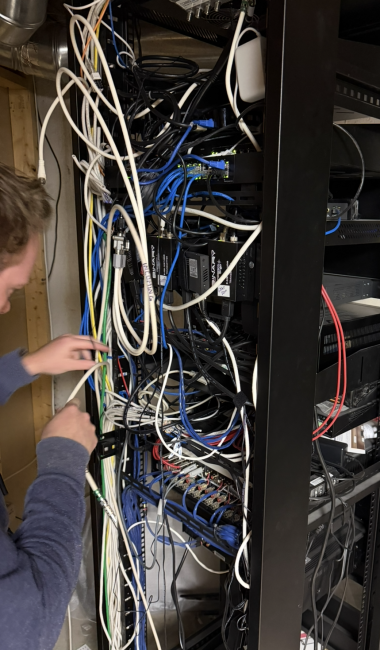
They had Comcast boosters, Eero equipment, older Ubiquiti access points, and two internet service providers all running at the same time. They knew the situation wasn't good. They just didn't know what to do about it.
I understand how that happens. Something doesn't work in one room, so you add a booster. Another area is unreliable, so you try another system. You keep spending money because the problem affects your life every day.
Eventually, nobody is quite sure what is connected to what.
Projects like this are some of my favorites because we can make a meaningful difference in both the experience and the organization behind it. But first, we have to understand what we're starting with.
Start With the Frustration
When someone tells me, “We pay for the fastest internet, but it still doesn't work,” I want to listen before recommending anything.
What does “doesn't work” mean in their home?
Are video calls dropping while someone works from home? Are shows buffering? Are the kids having trouble gaming? Does everything work in the kitchen but fall apart in the primary bedroom?
I also want to understand where people actually spend time. A home office may look like the obvious priority on a floor plan, but the client might take most of their calls somewhere else.
Then we investigate.
Sometimes I ask for the Wi-Fi information and get handed a list of network names and passwords. That tells me we need to understand how those systems fit together.
Multiple network names aren't automatically a problem. There are legitimate reasons to have a guest network, and multiple access points can be part of one well-designed system. But several systems added over time without a coordinated plan are a different situation.
Before we suggest buying anything, we need a baseline.
Fast Internet and Reliable Wi-Fi Are Different Things
I explain it this way: the internet service brings the connection into the home. The network inside the house distributes it.
You can have plenty of capacity coming in and still have a poor experience getting that connection to the places where you need it.
A bottleneck between pieces of equipment can limit performance. Poor wireless coverage can make one room frustrating even when another room works well.
Paying for a faster internet package doesn't automatically resolve either problem.
In my experience with our clients, an internet package that is too slow has rarely been the main issue. That doesn't mean service speed never matters. It means I want to understand the limitation before suggesting another monthly expense.
A Speed Test Is a Starting Point
Speed tests are useful, but we need to understand where and how we're testing.
A wired connection and a Wi-Fi connection in the same house can tell very different stories. A good result beside the router doesn't tell us what happens upstairs or when someone walks through the house on a call.
We look at the equipment connecting the network together, too. Are the switches appropriate for the system? Are the cables and connections working properly? Is a link between devices limiting everything downstream?
We also pay attention to how devices behave as people move around.
A phone or laptop may hold onto a weaker access point instead of switching promptly to a better connection. The experience can start out fine and become unreliable as someone moves into another room.
That's why “the speed test looked good” isn't the same as “the family's problem is solved.”
Sometimes We Need to Simplify Before We Add
In an existing home, troubleshooting can take time because we're often uncovering years of changes.
We want to identify what each device is doing, work out what still belongs, and isolate possible causes in a controlled way. That may mean temporarily disconnecting parts of the network and testing before building it back into a coherent system.
The goal is to understand whether the trouble is coming from the internet service, the network inside the home, or a particular device.
With the Bloomfield client, the cleanup was a substantial part of the improvement.
We removed old equipment and wiring, organized what remained, and labeled everything. The client now has a single Wi-Fi system with an updated network head end the core equipment managing and distributing the connection.
We also put remote support tools in place and included battery backup.
Those tools give us more ways to investigate and support the network. Battery backup can help keep connected equipment running through brief power interruptions, although it cannot guarantee that the internet provider's service stays available.
Just as importantly, the system is now understandable. We know what's there, how it's connected, and how to approach it when service is needed.
The client gained confidence in the network and in the support behind it. Luxury is confidence happened here.
Can You Improve Wi-Fi in a Finished Home?
Often, the first question is what infrastructure already exists.
Many custom homes have some network cabling, but we need to establish where it goes, its condition, and whether it can support the plan. The age of the house alone doesn't answer that.
Then we look at possible routes for anything additional.
Can we get a cable from one location to another through an accessible basement, attic, or utility space? Could a small opening in a closet or storage area give us the access we need?
We prefer to wire access points where practical. A properly planned mesh system may also be an option when cable routes are limited. The right answer depends on the home.
For a homeowner in Birmingham or Northville with finished ceilings and carefully selected interiors, that investigation matters. We want to understand the least disruptive practical approach before assuming the project requires opening walls.
The Real Test Happens After We Leave
We can test coverage and performance during a visit. But a house in the middle of a weekday may be very different from that same house in the evening.
Everyone comes home. Someone starts streaming. Someone else is gaming. Another person is finishing work.
We can't recreate every part of that experience during an appointment.
That's why I like to check in after the client has had a few evenings with the improved system.
How have the calls been? What are the kids saying? Are the places that used to be frustrating working better?
Those answers help us confirm the outcome and identify anything that still needs attention. The client shouldn't have to translate their experience into technical language. They can tell us what's happening, and we can investigate.
What to Have Ready for a Network Visit
Have your Wi-Fi information available so we can connect when we arrive, and make sure we can reach the equipment. Sometimes it's tucked behind boxes or stored belongings, which makes investigation harder.
It also helps to tell us which devices or rooms are giving you trouble and when it tends to happen.
You don't need to diagnose the cause or decide what to buy before calling. That's what we're there to help with.
Improving a home network is one of my favorite services we provide because it touches so much of daily life. Work, entertainment, music, and connected systems such as Sonos and Control4 all benefit from a network designed and configured for their needs.
When we get it right, the client can stop working around the system and start trusting it.
At Imagined Home Technology, we help homeowners in Birmingham, Bloomfield Hills, Northville, Plymouth, Grosse Pointe, and throughout Southeast Michigan understand and improve their home networks.
If you've already paid for faster internet and still feel frustrated, let's start by understanding what's happening in your home.